Live Video on E-commerce: The Dos and Don’ts
Mastering Live Streaming to Boost Your Online Sales

Currently, China is the global leader in e-commerce, mastering the art of livestream shopping. This trend has changed the standard for how brands engage consumers in real-time and set benchmarks for brands worldwide.
In the global e-commerce market, more and more platforms have incorporated live-streaming features. Live videos open doors to a higher possibility of making more sales and building a loyal community.
But hold up! Before you hit that “Go Live” button, you need to know how to optimize your live session. We’ve outlined the dos and don’ts of live video best practices to help you boost sales. Keep reading!
Getting Started with Live Video Shopping on Shopify
If you have a Shopify platform, you can incorporate a live-streaming app directly into your site. You can also do live streaming on social media like YouTube, but it would be challenging to include your Shopify products on the screen in a seamless way.
As a YouTube alternative, you can use the live-streaming app from Maestro. This app allows you to create a cohesive shopping experience by integrating your product catalog directly into the livestream.
Let us guide you through the installation with some live shopping tips:
- Download and install the Maestro app to your Shopify store.
- Follow the prompts to input the required information.
- When asked for your Maestro URL, enter it in this format: https://maestro.tv/yoursite.
- You will be redirected to the Maestro login page. Log in as an admin.
- Click “Yes” on the confirmation dialog to connect your Shopify store to Maestro.
- You’ll then return to Shopify to confirm the installation and accept a $0 recurring subscription.
- Then, navigate to Panels > Catalog > Shopify to add your Shopify store to your Maestro site.
- Use the Shopify overlay to display specific products over the video feed for direct purchases.
Once everything is set up, you can visit the Shopify Panel or Block in Maestro to choose which products or collections you want to feature actively. When you live, viewers can browse and buy items directly without leaving the stream.
DO These in Your Live Video
We’ve rounded up the right ways to host your live events. Here are five e-commerce video strategies you should consider.
Make Shopping Seamless with In-stream Checkout
Instead of redirecting buyers to a different webpage or requiring them to navigate away from the live stream, an in-stream checkout helps them to purchase products directly within the video interface.
To use this feature, make sure your checkout process is user-friendly and straightforward. You can also use clear prompts and visuals that guide viewers through adding items to their cart and completing their purchases without confusion.
This seamless process minimizes distractions and keeps viewers engaged with your content. Moreover, it can enhance the shopping experience, which can result in higher conversions and loyalty.
Engage Your Audience with Interactive Features
How to boost sales with live commerce? Engagement is key to a successful live shopping event. Your audiences will send questions through the comment box, and you must respond to them as soon as possible.
Making your audience part of the experience fosters a sense of community and connection. You can encourage audience participation by asking questions and prompting discussions about featured products.
Highlight Popular and High-demand Products
Popular and high-demand products should be the star in your live-streaming session. They can effectively capture your audience’s interest. If you don’t know which products to show, analyze your sales to know which items are trending.
Highlighting these products helps generate excitement. It also creates a sense of urgency, especially if they’re limited in stock or available at exclusive prices during the live event.
When presenting these products, provide detailed descriptions and demonstrate their use. This approach builds credibility and helps potential buyers to make the final decision during the live event.
Offer Exclusive Discounts and Limited-time Offers
As mentioned previously, a sense of urgency can drive viewers to make quick purchasing decisions. One effective way to do this is by offering exclusive discounts or limited-time offers during your live video sessions.
You can promote special pricing that is only available for the duration of the stream. Another way is to introduce flash sales, where specific products are discounted for a short period.
Make sure to announce these offers clearly and frequently throughout the session to capture your audience’s attention. The thrill of snagging a deal can motivate viewers to act fast!
Offer Same Day Delivery
If applicable, you can offer same-day delivery to enhance your competitive edge and appeal to consumers who value quick service. Remember, convenience is king in today’s fast-paced society.
When promoting your products during the live stream, highlight this delivery option as a unique selling point. However, your logistics must be well-organized to meet this demand and communicate the areas where same-day delivery is available.
This strategy encourages last-minute shoppers to take the plunge, knowing they can receive their products almost immediately after purchasing. A high level of service can boost customer satisfaction and increase the likelihood of repeat purchases.
DON’T DO These in Your Live Video
However, be careful. Here are five things you shouldn’t do in your live e-commerce video.
Avoid Overloading the Stream with Too Many Products
It’s always good to showcase your products during a live video. However, overloading your stream with too many items can overwhelm your audience. Worse, it can dilute your message. Therefore, you won’t effectively highlight key products.
To create a more impactful experience, prioritize quality over quantity. Select a few standout products that align with your theme or that you want to promote actively. Also, consider grouping products into collections or themes.
For example, if you’re featuring a skincare line, focus on a few key products that work well together, explaining their benefits and how they complement each other. Give each product adequate time in the spotlight to explore its features and advantages.
Forget to Promote the Event Beforehand
You can create buzz before your live event to maximize audience participation. Not promoting your session beforehand can result in low attendance, which undermines your sales potential, especially if you’re a small-scale business.
Start your promotional efforts well in advance using various channels to reach your audience (social media, email outreach, and your website). Consider hosting a countdown or interactive elements on social media to build anticipation.
Sometimes, engaging your audience before the event not only helps maximize attendance but also allows you to gather feedback on what products or topics they’re most interested in.
Stay Away from Overly Scripted Presentations
In fact, scripts can be super helpful for keeping things on track during your live session. However, remember not to rely too much on them. Relying too heavily on a scripted approach can make your live video feel robotic, and no one wants that.
You can aim for a more conversational tone. Keep your conversation running naturally by answering questions from audiences on the chat feature.
Meanwhile, use your script to help you decide what to do next. This approach encourages a stronger connection with your viewers, who can feel like part of a dialogue rather than passive observers.
Ignore Audience Questions or Feedback
Engagement is crucial during a live shopping event, and ignoring audience questions may disconnect you and your viewers. When viewers take the time to ask questions, it indicates interest and investment in what you’re presenting.
You can set aside specific moments to respond to inquiries. Another way is to make it a point to monitor the chat for questions as they come in. This shows that you value your audience’s input.
Pay attention to what resonates with your audience, as this can guide your product offerings, marketing strategies, and overall approach to live video. That’s when feedback from your viewers can offer valuable insights.
Neglect Camera and Audio Quality
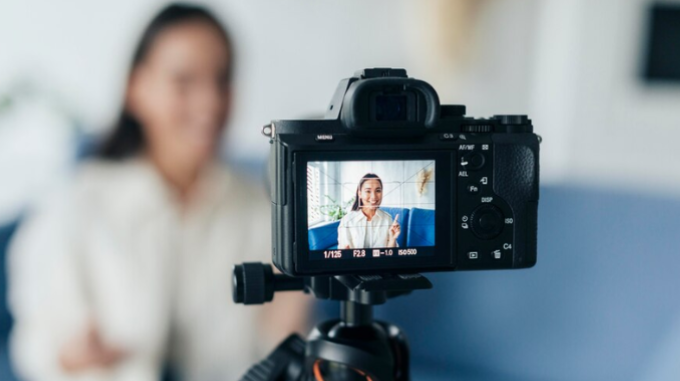
Invest in good equipment—such as a high-definition camera, external microphones, and proper lighting to enhance the quality of your stream. Test your setup before going live to ensure everything is functioning correctly.
On the other hand, poor camera and audio quality can lower the professionalism of your presentation and lead to a poor viewer experience. Viewers may struggle to engage with you if the video is grainy or the audio is unclear.
Also, consider the environment where you’re streaming. Choose a location or find a studio with minimal background noise. Your backdrop should also be clean and visually appealing.
Final Thoughts
Live video sessions are a game-changer in e-commerce. You can showcase products, connect with audiences in real time, and drive instant purchases from a single platform. Finding the right balance in your live video schedule is also key. For most brands, a weekly or biweekly live session strikes the perfect balance.